Which software should you use to play music remotely? 2026 Comparison

One band member now lives in another city, the rehearsal room is unavailable this week, or the only time slot that works for everyone would mean spending almost as long on the road as rehearsing. You may simply want to keep working on a song between studio sessions, without multiplying bookings or putting extra pressure on the band's budget.
In each of these situations, the problem isn't finding musicians: the band already exists and wants to keep playing. What becomes complicated is getting everyone in the same room regularly.
You could postpone the rehearsal, practise separately, or exchange recordings: these solutions have their uses, but they don't replace the moment when musicians play, listen, and adjust to one another. Whether for a duo or a small group, remote rehearsal software is designed to preserve that shared way of playing when meeting in person isn't possible.
The promise sounds simple on paper, but delivering on it is much harder: a conversation tolerates a slight delay fairly well, because everyone waits their turn without really thinking about it. In music, that same delay can be enough to make it difficult to stay in time. The result depends on the software, but also on the distance, the path your data takes across the Internet, the stability of each connection, the computer and the audio interface.
Not all solutions address exactly the same need, either. Some prioritise technical control, while others simplify setup as much as possible. Depending on the case, they are primarily for rehearsing with an existing band or also let you join public sessions and meet new musicians.
To make these differences concrete, we picked five software options for playing together remotely: Jamulus, SonoBus, FarPlay, JamKazam and NuCorder. This selection isn't exhaustive: JackTrip, Jamodio — currently in private beta —, Bonza Music and other projects also exist.
This comparison is published by NuCorder, so claiming absolute neutrality wouldn't be credible. What we can do instead is make our criteria explicit, rely on each vendor's public information, and acknowledge the cases where another solution better fits the need.
Quick overview
| NuCorder | Jamulus | SonoBus | FarPlay | JamKazam | |
|---|---|---|---|---|---|
| Country of origin | France | Germany | United States | United States | United States |
| Price |
| Free and open source | Free and open source |
|
|
| Audio architecture | Client-server | Client-server | Peer-to-peer | Peer-to-peer | Peer-to-peer or server |
| French interface | ✅ Yes (French, English, German and Spanish) | ✅ Yes | ❌ No | ❌ No | ❌ No |
| Video | Built in | ❌ No | External, via VDO.Ninja | Built in, including on Free | From Silver |
| Recording | ✅ Local, on the Free and Premium plans | ✅ If enabled by the server | ✅ Yes | ✅ From Standard; separate tracks on Standard+ | ✅ From Gold |
| Metronome | ✅ Yes, server-synchronized | ❌ No | ✅ Yes, sent as an audio stream | ❌ No | ✅ Yes, distributed in real time |
| Backing tracks | ❌ No | ❌ No, but external solutions exist | ✅ Yes, with looping | ✅ Yes, via the Input Mixer | ✅ Yes, built-in player |
| Audio transmission format | Opus | Opus | Opus or uncompressed PCM | Uncompressed PCM (48 kHz, 16-bit) | Opus |
| Systems | Windows / macOS; Linux on a best-effort basis | Windows / macOS / Linux | Windows / macOS / Linux / iOS / Android | Windows / macOS / Linux | Windows / macOS |
Pricing and features were checked in September 2026. They may change: each vendor's official page remains the reference.
NuCorder: rehearse with the musicians you already know
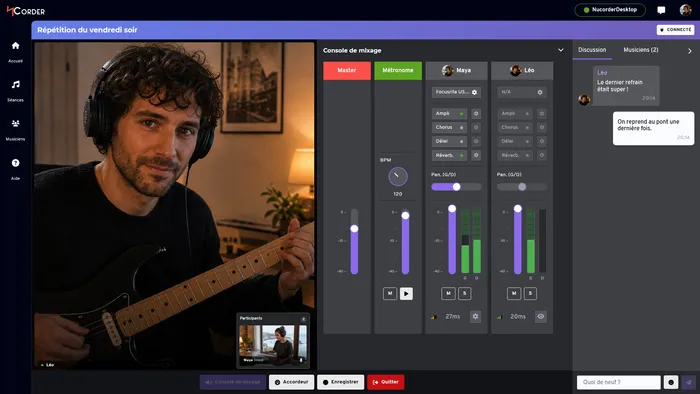
NuCorder is designed for musicians who already play together, but for whom distance, travel or an unavailable rehearsal room get in the way.
Rather than accumulating features, NuCorder aims to shorten the path from sending an invitation to actually playing together: preparing each setup, joining a private session, restoring your settings and checking that audio works in both directions.
Technically, NuCorder uses a client-server architecture comparable to Jamulus: audio streams pass through NuCorder's servers rather than connecting each participant directly to every other. This choice simplifies setup for some group configurations and allows processing to be centralised, but it doesn't remove network constraints. The distance to the server hosting the session, Internet routing, the computer, and the audio settings still shape the result.
NuCorder is regularly tested on Windows and macOS. A Linux version remains available, but it's offered on a best-effort basis: we don't currently have a recent Linux machine to validate every release under the same conditions and guarantee the same level of quality. Linux users are therefore encouraged to check their setup with their bandmates before planning a full rehearsal.
NuCorder remains a young product. Its recommended coverage currently focuses on mainland France and several neighbouring countries. NuCorder also lets you join open sessions and play with other musicians. As the network is still young, we're working to make it easier to meet other musicians.
The free plan lets you create private sessions of 30 minutes, join or create open sessions with no time limit, and record locally with no time limit. Premium costs €12.90 (including tax) per month and includes:
- private sessions with no time limit;
- five amp simulations, a chorus and a delay;
- free guests can join private sessions hosted by a Premium subscriber without a time limit.
A free Premium trial may be offered depending on the plan and your eligibility. Its duration is shown in your account before you subscribe. A payment card is required. If a trial is offered, the card is not charged immediately and you can cancel before it ends. Otherwise, billing starts when you subscribe.
NuCorder is best suited to groups who want to rehearse with their usual bandmates in private sessions and are within its recommended coverage area.
Jamulus: free, open-source and proven
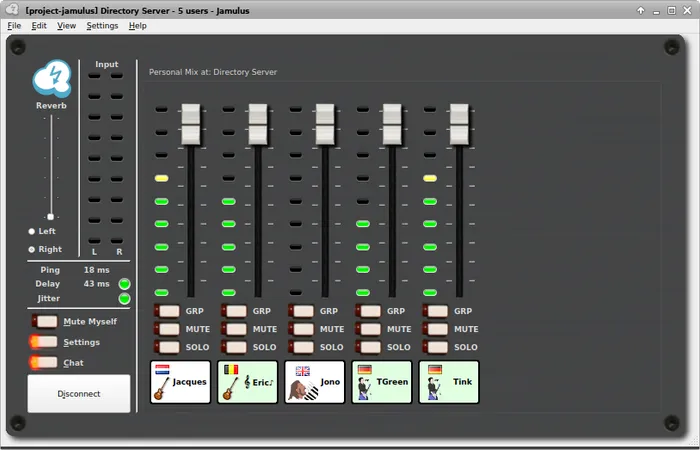
Jamulus is one of the early projects in remote music-making: the software is free and open source, and has been maintained by a community for many years.
We've tried Jamulus many times, and it quickly became our benchmark for quality testing. It's a robust solution, though technical and austere, that has earned a strong place in the community of tech-savvy musicians.
It runs on a client-server architecture: each musician joins a public or private server, which receives the audio streams before redistributing them to the other participants. Many public servers are available, and it's also possible to host your own.
With comparable audio settings, this setup limits bandwidth use for each musician: one audio stream goes to the server and one mixed stream comes back. In a peer-to-peer group where everyone connects directly to everyone else, as with SonoBus, each musician sends and receives one stream per other participant: for a group of n, that means n − 1 streams in each direction.
Jamulus's interface is functional rather than welcoming, and the first setup requires understanding a few audio and networking concepts. Recording depends on the server's settings, and video is not built in.
Jamulus is therefore a solid choice for musicians who are comfortable with technical setup, bands looking for an entirely free solution, or people who want to join public servers.
SonoBus: a wealth of options for peer-to-peer playing
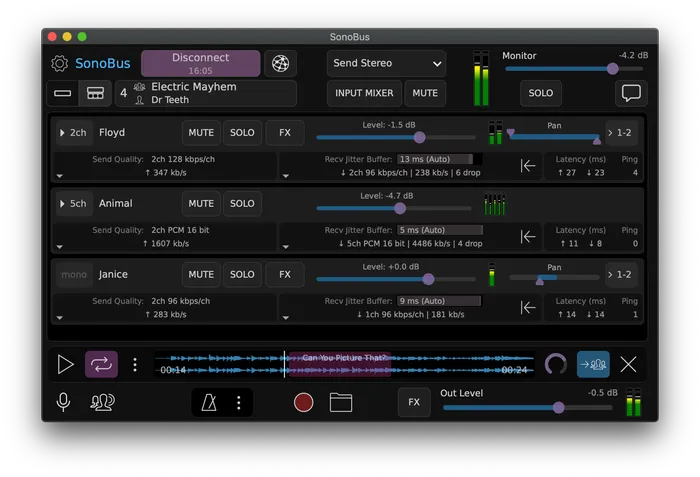
Like Jamulus, SonoBus is free and open source. Its core is peer-to-peer (P2P): each musician streams audio directly to every other connected musician, without an audio server in between.
Without a server relaying the audio, the direct route can mean a shorter round trip on paper. The trade-off is that every participant must send audio to all the others. A weak connection or a larger group can use up available bandwidth and affect stability.
SonoBus also offers a wide range of audio controls, including quality, compression, buffer size and per-participant mixing. If you enjoy tweaking network and audio settings, SonoBus gives you plenty to explore.
SonoBus is a good fit for musicians who enjoy fine-tuning audio and network settings. Its peer-to-peer approach works best when everyone's connection can handle the group.
FarPlay: a commercial peer-to-peer solution that works
FarPlay is a US-based commercial service for remote music sessions. It uses direct peer-to-peer connections, uncompressed PCM audio and built-in video; its latency can be adjusted automatically or manually.
Once we found the download link, getting started was simple: launch the app, share a room code with a partner, and play. The free version allows 45-minute sessions for two and gave us enough time to try it, including the video widget. We liked the sound quality, though we tested in the same room, so that result should be taken in that context.
We had to restart the app after disconnecting and switching from Wi-Fi to Ethernet. As with other peer-to-peer tools, bandwidth use grows with the group size, and FarPlay has no French interface. The FAQ has a lot of information and is clearly presented ; it also recommends Ethernet for each participant.
The paid plans start at $5.99/month (Standard); Standard+ is $7.99/month and For Teachers is $14.99/month. Only the host needs a subscription for paid session features.
FarPlay offers a simple way to start a direct music session, with a free trial and paid plans for longer or larger sessions.
JamKazam: a platform and an international community

JamKazam is a long-running US platform based in Austin, Texas, with an established international community. Alongside online sessions, it offers public sessions, ways to meet musicians, JamTracks, video and recording. Its terms list its Austin, Texas address.
Its audio setup is hybrid: depending on the session, musicians connect directly to one another or through a JamKazam server. This gives the platform more than one way to connect a group, while features and access to the server network vary by plan.
JamKazam is now rolling out a web-based interface alongside its desktop app. When we last tried it, we couldn't find the download link and ended up testing the legacy app. The interface can be difficult to navigate, but it also packs in a lot of features. Our experience reflects that older version; the current download page is available now.
The free plan has time and group-size limits; paid plans range from Silver at $4.99/month to Platinum at $19.99/month, with Gold at $9.99/month. New accounts get a 30-day Gold trial. Limits apply separately to each participant.
JamKazam combines a long-running music platform with a broad feature set; its interface takes time to learn, and plan limits vary by participant.
Which solution should you consider for your needs?
A table can help point the way, but it will never replace a trial with your own gear and your own bandmates.
| Your priority | Options to consider |
|---|---|
| You want free, open-source software and are comfortable with technical setup | Jamulus or SonoBus |
| You want to find musicians to play with | JamKazam or Jamulus |
| You want extra tools such as a metronome, backing tracks, effects or recording |
|
| You need a French-language interface | NuCorder or Jamulus |
| Your players are nearby, but a central server is too far away* | SonoBus, FarPlay or JamKazam's peer-to-peer mode |
* Peer-to-peer avoids routing audio through a central server, but doesn't guarantee lower latency; the actual route and each player's connection still matter.
NuCorder's deliberate choices
Hosting the main infrastructure in France
NuCorder's main servers are currently hosted in France. This location allows reasonable coverage of mainland France, Belgium, Luxembourg and Andorra.
NuCorder remains accessible from other countries on a best-effort basis: the result then depends more heavily on distance and the path taken by the data. Learn more about NuCorder's geographic coverage.
Like most online services, NuCorder also uses third-party providers that may process some data on their own infrastructure.
Centralising audio streams
During a session, each participant connects to a NuCorder server. Their audio stream reaches that server before being sent on to the other musicians.
This choice avoids some of the constraints of peer-to-peer when several people play together. It doesn't, however, make quality independent of the network: an unstable connection, Wi-Fi, an overloaded machine, or a poorly configured audio interface can still degrade the session.
Aiming for low latency without promising a universal number
To play together, every millisecond counts. It would still be misleading to advertise a single latency figure valid for every setup: the measurement depends on the network, the distance, the computer, the audio interface and the settings chosen.
We'd rather show real sessions and let each band test their own setup than turn a measurement taken under good conditions into a general promise.
Supporting French-speaking musicians
NuCorder's app, documentation and support are available in both English and French. This choice doesn't change the sound quality, but it can make a real difference when you need to understand why a first session isn't starting as expected.
Letting you test before subscribing
The free plan lets you run a 30-minute private session with your band. That's enough time to check everyone's setup, test the connection, and work out whether NuCorder fits the participants' real-world conditions.
Premium becomes especially useful once the band wants to rehearse regularly and no longer be limited by the length of private sessions.
Frequently asked questions
What Internet connection do you need to play online?
A fibre connection is recommended, with each computer connected to its router by Ethernet. Wi-Fi can introduce latency and stability variations that are hard to compensate for when making music in real time.
Bandwidth alone doesn't predict the result, though: connection stability, Internet routing, and the distance between each musician and the server also matter.
What latency is acceptable for playing together?
There is no universal threshold. What feels acceptable depends on the instrument, tempo, distance and equipment. Drums and rhythmically active bass parts generally tolerate less delay than slower work on pads or sustained chords.
The most useful approach is to test with a song that reflects the way your band normally plays.
Do you need an external audio interface?
On Windows, an external audio interface is not required: NuCorder also supports WASAPI, which lets you use more audio devices. For lower local latency, an ASIO-compatible external soundcard and driver are still recommended. On macOS, the audio mechanisms are different, but a properly configured interface is still recommended to reduce local latency and get a more predictable result.
On Linux, NuCorder remains available on a best-effort basis. Since we currently can't validate every release on a recent machine under the same conditions as Windows and macOS, compatibility and performance may vary by distribution and audio setup.
Can you play drums remotely?
It's possible, but drums are among the instruments most sensitive to delay. The result depends on the distance, the connection, and each musician's setup. It's best to test a session with your band before planning a full rehearsal.
Is NuCorder really free?
Yes. The free plan lets you create a 30-minute private session, invite your band, join or create open sessions with no time limit, and record locally with no time limit.
Premium is designed for bands who want to rehearse regularly in private sessions with no time limit.
Can you record a session?
Yes. NuCorder lets you record locally with no time limit, on both the Free and Premium plans. SonoBus also offers recording. On Jamulus, this depends on the server's configuration; on JamKazam, it starts with the Gold plan. On FarPlay, Standard adds audio mix and combined video recording; Standard+ allows separate tracks for each participant.
Before choosing a solution
The table compares features and prices, but it cannot predict how a session will work for your group. Latency and audio stability also depend on each participant's connection, distance and equipment.
Try a session with your usual bandmates and equipment. Play a song you know, then check whether the sound, latency and available features suit the way you rehearse.